ONTAP 9.5でsambaドメインに参加できない & ONTAP 9.7で失敗

samba 4.11.6で作ったActive DirectoryにONTAP 9.5を参加させようとするとエラーになる。

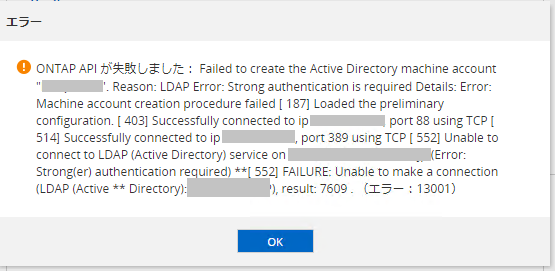
ONTAP API が失敗しました: Failed to create the Active Directory machine account "ファイルサーバ名". Reason: LDAP Error: Strong authentication is required Details: Error: Machine account creation procedure failed [ 136] Loaded the preliminary configuration. [ 215] Successfully connected to ip ADサーバIP, port 88 using TCP [ 284] Successfully connected to ip ADサーバIP, port 389 using TCP [ 308] Unable to connect to LDAP (Active Directory) service on ADサーバホスト名 (Error: Strong(er) authentication required) **[ 308] FAILURE: Unable to make a connection (LDAP (Active ** Directory):AD名), result: 7609 . (エラー:13001)

調べたところ、sambaのglobal設定で「ldap server require strong auth = no」を設定する、とのこと。

これを設定し、sambaを再起動したところ、参加できた。


ONTAP 9.7にて、上記手順を実施した上で参加を試みたところ「Unable to connect to NetLogon service on」というエラーになった。

netapp::> vserver cifs create -vserver ファイルサーバ名 -cifs-server ファイルサーバ名 -domain AD名 -ou CN=Computers -default-site "" -status-admin up -comment "" -netbios-aliases ファイルサーバ名

In order to create an Active Directory machine account for the CIFS server, you
must supply the name and password of a Windows account with sufficient
privileges to add computers to the "CN=Computers" container within the
"AD名" domain.

Enter the user name: administrator

Enter the password:

Warning: An account by this name already exists in Active Directory at
         CN=ファイルサーバ名,CN=Computers,DC=xx,DC=xx.
         If there is an existing DNS entry for the name ファイルサーバ名, it must be
         removed. Data ONTAP cannot remove such an entry.
         Use an external tool to remove it after this command completes.
         Ok to reuse this account? {y|n}: y

Error: Machine account creation procedure failed
  [    31] Loaded the preliminary configuration.
  [   107] Created a machine account in the domain
  [   108] SID to name translations of Domain Users and Admins
           completed successfully
  [   113] Modified account 'cn=ファイルサーバ名,CN=Computers,dc=xx
           =CO,dc=JP'
  [   114] Successfully connected to ip xx.xx.xx.xx, port 88 using
           TCP
  [   129] Successfully connected to ip xx.xx.xx.xx, port 464
           using TCP
  [   216] Kerberos password set for 'ファイルサーバ名$@AD名'
           succeeded
  [   216] Set initial account password
  [   223] Successfully connected to ip xx.xx.xx.xx, port 445
           using TCP
  [   274] Successfully connected to ip xx.xx.xx.xx, port 88 using
           TCP
  [   297] Successfully authenticated with DC
           adserver.AD名
  [   322] Unable to connect to NetLogon service on
           adserver.AD名 (Error:
           RESULT_ERROR_GENERAL_FAILURE)
**[   322] FAILURE: Unable to make a connection
**         (NetLogon:AD名), result: 3
  [   322] Unable to make a NetLogon connection to
           adserver.AD名 using the new machine account

Error: command failed: Failed to create the Active Directory machine account
       "ファイルサーバ名". Reason: general failure.

netapp::>

このとき「vserver cifs security show -vserver ファイルサーバ名」で確認する「SMB? Enabled for DC Connections」は下記の通り。

netapp::> vserver cifs security show -vserver ファイルサーバ名

Vserver: ファイルサーバ名

                            Kerberos Clock Skew:                   - minutes
                            Kerberos Ticket Age:                   - hours
                           Kerberos Renewal Age:                   - days
                           Kerberos KDC Timeout:                   - seconds
                            Is Signing Required:                   -
                Is Password Complexity Required:                   -
           Use start_tls for AD LDAP connection:               false
                      Is AES Encryption Enabled:               false
                         LM Compatibility Level:  lm-ntlm-ntlmv2-krb
                     Is SMB Encryption Required:                   -
                        Client Session Security:                none
                SMB1 Enabled for DC Connections:               false
                SMB2 Enabled for DC Connections:      system-default
  LDAP Referral Enabled For AD LDAP connections:               false
               Use LDAPS for AD LDAP connection:               false

netapp::>

「SMB1 Enabled for DC Connections」をtrueに変更しても状況は変わらず。

Sambaサーバの /usr/local/samba/var/log.samba を確認すると、以下の出力があった。

[2020/08/07 14:26:55.226653,  0] ../../source4/rpc_server/netlogon/dcerpc_netlogon.c:284(dcesrv_netr_ServerAuthenticate3_helper)
  dcesrv_netr_ServerAuthenticate3_helper: schannel required but client failed to offer it. Client was ファイルサーバ名$

「schannel」というオプションが必要らしい。

Netlogon Issue “schannel required”」を参考に設定してみたところ、schannelというオプションはないというエラー…「Bug 13464 – smb.conf-configuration “server schannel = auto” needed in future versions」を見ると「server schannel = auto」が正しい模様。

/usr/local/samba/etc/smb.conf を下記の様に修正して、sambaを再起動したところ、ONTAP 9.7でのActive Directoryの参加が可能になった。

# Global parameters
[global]
        netbios name = ADサーバ名
        realm = AD名
        server role = active directory domain controller
        workgroup = AD名
        idmap_ldb:use rfc2307 = yes
        ldap server require strong auth = no
        server schannel = auto

[netlogon]
        path = /usr/local/samba/var/locks/sysvol/AD名/scripts
        read only = No

[sysvol]
        path = /usr/local/samba/var/locks/sysvol
        read only = No

samba 4で構築したドメインにNetApp 9.5が登録できない

注:この記事での事象はsamba 4で使用していた証明書の期限切れが原因でした。
「LDAP Error: Strong authentication is required Details」もしくは「「Unable to connect to NetLogon service on」」というエラーがでる場合については別途「ONTAP 9.5でsambaドメインに参加できない & ONTAP 9.7で失敗」という記事にしています。


テスト環境作成のためNetAppシミュレータの9.5P6を作ってsamba 4で構築したActive Directory環境に登録しようとした・・・

netapp95sim::*> vserver cifs create -cifs-server netappcifs -domain ad.osakana.net -ou CN=Computers -vserver netappcifs -netbios-aliases netappcifs

In order to create an Active Directory machine account for the CIFS server, you must supply the name and password of a
Windows account with sufficient privileges to add computers to the "CN=Computers" container within the "AD.OSAKANA.NET"
domain.

Enter the user name: administrator

Enter the password:

Error: Machine account creation procedure failed
  [   215] Loaded the preliminary configuration.
  [   267] Successfully connected to ip 172.17.44.49, port 88 using
           TCP
  [   342] Successfully connected to ip 172.17.44.49, port 636 using
           TCP
  [   379] Required certificate with CA ADSERVER.ad.osakana.net is
           not installed
  [   381] Unable to start LDAPS: Can't contact LDAP server
  [   381] Additional info: error:14090086:SSL
           routines:ssl3_get_server_certificate:certificate verify
           failed
  [   381] Unable to connect to LDAP (Active Directory) service on
           adserver.ad.osakana.net (Error: Can't contact LDAP
           server)
**[   381] FAILURE: Unable to make a connection (LDAP (Active
**         Directory):AD.OSAKANA.NET), result: 7642

Error: command failed: Failed to create the Active Directory machine account "netappcifs". Reason: LDAP Error: Cannot
       contact the LDAP server.

netapp95sim::*>

エラー発生。

なんか調べたところ、active-directoryというコマンドでも登録できるらしいのでそれでもテストしてみる。

netapp95sim::*> active-directory create -vserver netappcifs -account-name adserver -domain ad.osakana.net
  (vserver active-directory create)

In order to create an Active Directory machine account, you must supply the name and password of a Windows account with
sufficient privileges to add computers to the "CN=Computers" container within the "AD.OSAKANA.NET" domain.

Enter the user name: administrator

Enter the password:

Error: Machine account creation procedure failed
  [   179] Loaded the preliminary configuration.
  [   230] Successfully connected to ip 172.17.44.49, port 88 using
           TCP
  [   298] Successfully connected to ip 172.17.44.49, port 636 using
           TCP
  [   333] Required certificate with CA ADSERVER.ad.osakana.net is
           not installed
  [   335] Unable to start LDAPS: Can't contact LDAP server
  [   335] Additional info: error:14090086:SSL
           routines:ssl3_get_server_certificate:certificate verify
           failed
  [   336] Unable to connect to LDAP (Active Directory) service on
           adserver.ad.osakana.net (Error: Can't contact LDAP
           server)
**[   336] FAILURE: Unable to make a connection (LDAP (Active
**         Directory):AD.OSAKANA.NET), result: 7642

Error: command failed: Failed to create the Active Directory machine account "ADSERVER". Reason: LDAP Error: Cannot
       contact the LDAP server.

netapp95sim::*>

同じようにエラー。

この後いろいろ試行錯誤した結果、自己証明CAをNetAppに入れればいいのでは?とやってみた。(「クラスタまたはSVMがクライアントであるSSLサーバを認証するためのサーバCA証明書のインストール」)

netapp95sim::*> security certificate install -vserver netappcifs -type server-ca

Please enter Certificate: Press <Enter> when done
-----BEGIN CERTIFICATE-----
<sambaの/usr/local/samba/private/tls/ca.pemの内容を張り付け>
-----END CERTIFICATE-----


Error: command failed: The certificate has expired.

netapp95sim::*>

ん?「The certificate has expired.」???

samba公式「Configuring LDAP over SSL (LDAPS) on a Samba AD DC」の「Verifying the certificate」に書いてある手法で確認してみます。

# ls -l  /usr/local/samba/private/tls
合計 12
-rw-r--r--. 1 root root 2041  3月 27  2018 ca.pem
-rw-r--r--. 1 root root 2045  3月 27  2018 cert.pem
-rw-------. 1 root root 3243  3月 27  2018 key.pem
#

# openssl verify /usr/local/samba/private/tls/cert.pem -CApath /usr/local/samba/private/tls/ca.pem
/usr/local/samba/private/tls/cert.pem: O = Samba Administration, OU = Samba - temporary autogenerated HOST certificate, CN = ADSERVER.AD.OSAKANA.NET
error 20 at 0 depth lookup:unable to get local issuer certificate
Error opening certificate file -CApath
140285523859344:error:02001002:system library:fopen:No such file or directory:bss_file.c:402:fopen('-CApath','r')
140285523859344:error:20074002:BIO routines:FILE_CTRL:system lib:bss_file.c:404:
unable to load certificate
/usr/local/samba/private/tls/ca.pem: O = Samba Administration, OU = Samba - temporary autogenerated CA certificate, CN = ADSERVER.AD.OSAKANA.NET
error 18 at 0 depth lookup:self signed certificate
O = Samba Administration, OU = Samba - temporary autogenerated CA certificate, CN = ADSERVER.AD.OSAKANA.NET
error 10 at 0 depth lookup:certificate has expired
OK
#

はい。証明書の有効期限切れでした。

手順がめんどいので、/usr/local/samba/private/tlsにあるファイルをリネームしてから「systemctl stop samba-ad-dc.service」「systemctl start samba-ad-dc.service」で強制再作成させました。

iredmail運用メモ 2021/09/09版

現状最新はAlmaLinux9ベースサーバに置き換えた際に作成した iredmail運用メモ 2024/12/19版 です

2019/12/06版:新規作成
2021/09/09版:更新


2021/09/09版前書き

2019年7月ぐらいから postfix+dovecot+iredmail環境の運用を開始し、2年が経過しました。

追加1:salesforce.comからのメールに対するgreylist適用取りやめ

salesforce.comからのメールは「23sadf984tasd.49fv2fdsdf.k54hsd74.ap23.bnc.salesforce.com」というような差し出しアドレスで送信されており、このアドレスはユーザごとに違うらしいようで、自動処理がうまくできませんでした。

調べて見るとiredmailフォーラム「How do I whitelist this sender?」にて、「python2 greylisting_admin.py –disable –from @.salesforce.com を実行してgreylist対象外にしろ」という回答が・・・

[root@mailserver ~]# /opt/iredapd/tools/greylisting_admin.py --disable --from @.salesforce.com
* Disable greylisting: @.salesforce.com -> @.
[root@mailserver ~]#

これで、salesforce.comからのメールは全て届くようになりました。

追加2:特定IPアドレスから送信されるメールの取り扱い

ユーザが開設しているウェブにあるフォームから送られてくるメールの送信者設定がうまく調整できないらしく、不適切なもので送信されてくる。

仕方が無いので、そのウェブサーバのIPアドレスから送られてくるメールへのgreylist適用をやめた

[root@mailserver ~]# /opt/iredapd/tools/greylisting_admin.py --disable --from  1xx.2xxx.1xx.1xxx
* Disable greylisting: 1xx.2xxx.1xx.1xxx -> @.
[root@mailserver ~]#


2019/12/06版前書き

qmail+vpopmailの環境からpostfix+dovecot+iredmail環境にテスト移行してもうすぐ1年、本稼働させて5ヶ月経ちました。

いろいろ行った対処についてのまとめです。

その1: Windows Live Mail 2012ユーザがいる場合の問題

iredmailの標準設定ではWindows Live Mail 2012でのPOP3アクセスによるメール受信に失敗します。原因はWindows Live Mail 2012はSSL無し+メールパスワードを平文で送ってしまうが、iredmail側では平文拒否+SSLのみ受付、という設定であるため拒否されているためです。

また、メール送信時も、Windows Live Mail 2012がメールサーバに送るホスト名情報(HELOコマンド)がiredmailが期待する書式になっていないために拒否されます。

この2点を解消するためにdovecotの設定と、postfixの設定を変更する必要があります。詳細は下記を参照のこと。

詳細:[postfix/dovecotメールサーバでWindows Live Mail 2012がエラーになる]

その2: WebメールのRoundcubeをアップデートする場合の問題

iredmailではWebメールとしてRoundcubeSOGoを利用できます。

SOGoはRPM提供なのでアップデートは簡単ですが、Roundcubeはphpコマンドを利用してのアップデートとなっています。

しかし、iredmail標準設定ではセキュリティ強化のphp設定がされているため、Roundcubeのアップデートスクリプトが必要とするphpの機能が使用できない状態となっています。

phpの設定を変更せずにroundcubeのアップデートスクリプトを実行するには下記を参照してください。

詳細:[php.iniを変更せずにdisable_functionsの内容を無効化してroundcubeのアップグレードスクリプトを動作させる方法]

その3: 自サーバ以外で送信されたメールが受信拒否になる問題

iredmail標準設定では、iredmailサーバ以外から送信された自ドメインメールを受信拒否します。

これは、iredapdの機能で拒否しています。

iredapdの設定にSPFレコードに登録されているサーバからの送信であれば許可する、という設定があるのでそれを有効にして回避します。

詳細:[postfixを使用したiredmailで他サーバで送信された自ドメインメールが受信拒否される]

その4: Barracudacentralがメールを拒否しすぎる問題

本格運用しはじめてからログを確認してみると、BarracudacentralのSPAMデータベースを参照にしたメール受信拒否率がとても高いことが判明。

ちょっとでも疑われたら登録されているレベルのようなので誤爆率がかなり高い。特に中小企業からのメールと(ちゃんとした)メルマガ系での拒否率が高すぎた。

このため、うちのサイトの運用ではbarracudacentralの使用はやめて、spamhaus.orgのみの運用にしている。

[iRedMailの初期設定から変えたところ 2018/08/21版]

その5: mail.goo.ne.jpメールが拒否される問題

iredmailが用意している/etc/postfix/helo_access.pcreを見てみると、なんとmail.goo.ne.jpメールが明示的に拒否されていた。

いったい過去に何をやらかしたのか・・・と驚愕しつつも受信できるように設定変更している。

[iRedMailの初期設定から変えたところ 2018/08/21版]

その6: ホスト名にIPアドレスっぽい文字列が入っていると拒否される問題

SPAMを送信してくるIPアドレスについてホスト名を調べて見るとIPアドレスっぽいホスト名( network-192-168.0.100.ぷろばいだ.ne.jp )であることが多い。

このため、iredmail標準設定ではこういったホスト名からのメールは拒否しているが、拒否ログを確認してみると、Amazon AWSサービスを使っているところからのメールが結構そんな感じのホスト名で送られていて、拒否率も高かった。

このため、IPアドレスっぽいホスト名からのメールは拒否、という設定を外した。

[iRedMailの初期設定から変えたところ 2018/08/21版]

その7: メールがすぐに届かず30分程度遅延する問題

SPAMメールの送信システムは再送処理は行わず、送信できなかったらすぐに次を送るような実装になっていることが多い。

このため、iredmailでは1回目の送信処理では、今忙しいからあとでもう1回送って、と返して、15分後から受信するようになっている。

しかし、分かっているドメインからのメールだったらすぐに受信できるようにしたい、という場合はwhitelistdomainを設定することで、該当するドメインでDNSのSPFレコードに登録されているメールサーバからのメールであればすぐに受信する、という設定を行っている。

[iRedMailの初期設定から変えたところ 2018/08/21版]

その6: vpopmailからユーザパスワードを移行した場合の問題点

これは該当する人があまりいないと思いますが、vpopmailで使っていたパスワード文字列(MD5エンコード)をそのままiredmailに持ってくると、dovecotとpostfixでは使えます。

しかし、SOGoとiredmailの管理画面ではSHA256エンコードであると想定した処理となっているため使えず、ログインできません。

これはどうしようもないので、パスワードを再設定してください。

[ユーザバックエンドがSQLのiredmailのSOGoでユーザがログインできない]

samba 4.10.x環境で出てたsamba_dnsupdateのエラー対処

samba 4.10.7へアップデートしたあと、「systemctl status samba-ad-dc.service」で出力されるログを見てみたら、微妙な感じのエラーがあった。

 8月 29 08:54:02 adserver samba[107156]: [2019/08/29 08:54:02.287210,  0] ../../lib/util/util_runcmd.c:327(samba_runcmd_io_handler)
 8月 29 08:54:02 adserver samba[107156]:   /usr/local/samba/sbin/samba_dnsupdate: ImportError: No module named dns.resolver
 8月 29 08:54:02 adserver samba[107156]: [2019/08/29 08:54:02.295161,  0] ../../source4/dsdb/dns/dns_update.c:331(dnsupdate_nameupdate_done)
 8月 29 08:54:02 adserver samba[107156]:   dnsupdate_nameupdate_done: Failed DNS update with exit code 1
 8月 29 08:54:03 adserver winbindd[107159]: [2019/08/29 08:54:03.430795,  0] ../../source3/winbindd/winbindd_cache.c:3166(initialize_winbindd_cache)
 8月 29 08:54:03 adserver winbindd[107159]:   initialize_winbindd_cache: clearing cache and re-creating with version number 2
 8月 29 08:54:03 adserver smbd[107151]: [2019/08/29 08:54:03.438943,  0] ../../lib/util/become_daemon.c:136(daemon_ready)
 8月 29 08:54:03 adserver smbd[107151]:   daemon_ready: daemon 'smbd' finished starting up and ready to serve connections
 8月 29 08:54:03 adserver winbindd[107159]: [2019/08/29 08:54:03.454411,  0] ../../lib/util/become_daemon.c:136(daemon_ready)
 8月 29 08:54:03 adserver winbindd[107159]:   daemon_ready: daemon 'winbindd' finished starting up and ready to serve connections

「samba_dnsupdate: ImportError: No module named dns.resolver」の対応

現状の確認方法

[root@adserver ~]# samba_dnsupdate --verbose
Traceback (most recent call last):
  File "/usr/local/samba/sbin/samba_dnsupdate", line 57, in <module>
    import dns.resolver
ImportError: No module named dns.resolver
[root@adserver ~]#

原因はpythonのDNS toolkitがインストールされていないこと。

CentOS7環境で対処するには「yum search dnspython」を実行してモジュール名を確認

[root@adserver ~]# yum search dnspython
読み込んだプラグイン:fastestmirror
Determining fastest mirrors
 * base: ftp.riken.jp
 * epel: ftp.riken.jp
 * extras: ftp.riken.jp
 * updates: ftp.riken.jp
=============================== 一致: dnspython ================================
python-dns.noarch : DNS toolkit for Python
python36-dns.noarch : DNS toolkit for Python 3
[root@adserver ~]#

今回使っている環境はpython 2環境なので、「yum install python-dns」でインストール。

[root@adserver ~]# yum install python-dns.noarch
読み込んだプラグイン:fastestmirror
Loading mirror speeds from cached hostfile
epel/x86_64/metalink                                     | 7.3 kB     00:00
 * base: ftp.riken.jp
 * epel: ftp.riken.jp
 * extras: ftp.riken.jp
 * updates: ftp.riken.jp
base                                                     | 3.6 kB     00:00
epel                                                     | 5.4 kB     00:00
extras                                                   | 3.4 kB     00:00
packages-microsoft-com-prod                              | 2.9 kB     00:00
updates                                                  | 3.4 kB     00:00
(1/3): epel/x86_64/updateinfo                              | 998 kB   00:02
(2/3): packages-microsoft-com-prod/primary_db              | 200 kB   00:00
(3/3): epel/x86_64/primary_db                              | 6.8 MB   00:03
依存性の解決をしています
--> トランザクションの確認を実行しています。
---> パッケージ python-dns.noarch 0:1.12.0-4.20150617git465785f.el7 を インスト ール
--> 依存性解決を終了しました。

依存性を解決しました

================================================================================
 Package        アーキテクチャー
                           バージョン                            リポジトリー
                                                                           容量
================================================================================
インストール中:
 python-dns     noarch     1.12.0-4.20150617git465785f.el7       base     233 k

トランザクションの要約
================================================================================
インストール  1 パッケージ

総ダウンロード容量: 233 k
インストール容量: 1.0 M
Is this ok [y/d/N]: y
Downloading packages:
python-dns-1.12.0-4.20150617git465785f.el7.noarch.rpm      | 233 kB   00:00
Running transaction check
Running transaction test
Transaction test succeeded
Running transaction
  インストール中          : python-dns-1.12.0-4.20150617git465785f.el7.no   1/1
  検証中                  : python-dns-1.12.0-4.20150617git465785f.el7.no   1/1

インストール:
  python-dns.noarch 0:1.12.0-4.20150617git465785f.el7

完了しました!
[root@adserver ~]#

動作確認・・・

[root@adserver ~]# samba_dnsupdate --verbose
IPs: ['172.17.44.49']
Looking for DNS entry A adserver.adosakana.local 172.17.44.49 as adserver.adosakana.local.
Looking for DNS entry NS adosakana.local adserver.adosakana.local as adosakana.local
<略>
Checking 0 100 389 adserver.adosakana.local. against SRV _ldap._tcp.Default-First-Site-Name._sites.ForestDnsZones.adosakana.local adserver.adosakana.local 389
No DNS updates needed
[root@adserver ~]#

それ以外のログについて

samba_dnsupdateに関するエラーについて対処した後、sambaを再起動してログを見てみると、下記の様な感じになっていた。

 8月 29 09:06:46 adserver samba[107294]: [2019/08/29 09:06:46.991243,  0] ../../source4/smbd/server.c:773(binary_smbd_main)
 8月 29 09:06:46 adserver samba[107294]:   binary_smbd_main: samba: using 'standard' process model
 8月 29 09:06:47 adserver samba[107294]: [2019/08/29 09:06:47.021548,  0] ../../lib/util/become_daemon.c:136(daemon_ready)
 8月 29 09:06:47 adserver samba[107294]:   daemon_ready: daemon 'samba' finished starting up and ready to serve connections
 8月 29 09:06:49 adserver winbindd[107312]: [2019/08/29 09:06:49.157089,  0] ../../source3/winbindd/winbindd_cache.c:3166(initialize_winbindd_cache)
 8月 29 09:06:49 adserver winbindd[107312]:   initialize_winbindd_cache: clearing cache and re-creating with version number 2
 8月 29 09:06:49 adserver winbindd[107312]: [2019/08/29 09:06:49.266323,  0] ../../lib/util/become_daemon.c:136(daemon_ready)
 8月 29 09:06:49 adserver winbindd[107312]:   daemon_ready: daemon 'winbindd' finished starting up and ready to serve connections
 8月 29 09:06:50 adserver smbd[107311]: [2019/08/29 09:06:50.436561,  0] ../../lib/util/become_daemon.c:136(daemon_ready)
 8月 29 09:06:50 adserver smbd[107311]:   daemon_ready: daemon 'smbd' finished starting up and ready to serve connections

RHEL7だと上記出力を赤文字で出力してるけど、内容を見る限りではinformation的なものであるので、特に対処する必要はなさそうである。

qmailの情報収集 2025/12/29

2019/08/26: このURLの初期版作成
2023/11/17: 情報更新
2025/12/29: 情報更新


qmailを使ってないけど、このURLや2016年の「qmailの情報収集 2016/03/31」と2012年の「いまさらqmailのパッチ情報収集 2012/02/17」には今もアクセスがあるので内容を更新しておく。

2025/12/29のトピック

netqmail2024/05/07に1.09をリリース。その後、2025年8月にgithubは更新されている
s/qmailは2025/08/30に4.3.24をリリース。
IndiMail2025/12/18にindimail-mta 3.1をリリース

とはいえ、なんというか、メンテナンスが大変なので、qmailを使い続けない方が・・・

2023/11/17のトピック

・netqmail.orgとqmail.orgのサイト消滅
djbのqmailページは現存しているがメンテナンスはされていない
notqmail2020/05/20に1.08をリリースしたのが最後だが、githubでは開発継続中
s/qmailはURL変更。2023/10/22 4.2.28を出し、4.3を開発中
・openQmailはサイト消滅
・aQmailはgithubあるけど2017年12月以降未更新
・IndiMailはgithubが公式ページ化? ソースコードはgithubsourceforge

継続してメンテナンスされているのは、IndiMail と s/qmail であるようだ。

実際の運用に関して参考になりそうな資料

saGredo.eu linux notePatching qmail
qmailへの各種パッチ適用手法について

saGredo.eu linux noteConfiguring DKIM for qmail
qmailのvirtualdomain環境時に署名を行う手法をindimailによるqmail-dkimパッチ集を使用して解説。なお、IndiemailでのDKIM関連記述


ここから下は以前の記述


うちはqmailを使わなくなったけど、使っていた当時に書いた2016年の「qmailの情報収集 2016/03/31」と2012年の「いまさらqmailのパッチ情報収集 2012/02/17」には、いまでもちらほらアクセスがある。

で・・・最近、qmail的に大ニュースがあったので久々に情報更新。

期待の新星「notqmail」リリース

1998年6月リリースのqmail v1.03に対するパッチをまとめたnetqmail がv1.04として2003年10月にリリースされた。しかし、netqmailは2007年11月のv1.06を最後に更新が無くなった。

今回、qmailでもnetqmailでもないものとして、notqmailがv1.07としてリリースされた。

ゆくゆくはいろんな機能を取り入れることになっていく予定ですが、現状では有名どころの既存qmailパッチ間の差異が大きいようで、notqmailのブランチとして各パッチ適用済みバージョンも提供されている。(詳細は公式ページのPatchesを参照のこと)

BranchOriginal Patch
notqmail-badmailfrom-wildcardTom Clegg’s badmailfrom wildcard
notqmail-badmailfrom-x-relayclientJeremy Kitchen’s badmailfrom-x-relayclient
notqmail-big-concurrencyJohannes Erdfelt’s big-concurrency
notqmail-big-todoRussell Nelson’s big-todo
notqmail-dns-any-to-cnameJonathan de Boyne Pollard’s any-to-cname
notqmail-dns-oversizeChristopher K. Davis’s oversize DNS packet
notqmail-ext-todoAndré Opperman’s ext_todo or “silly qmail syndrome”
notqmail-smtp-authErwin Hoffmann’s smptauth
notqmail-smtp-tlsFrederik Vermeulen’s qmail-smtp-tls
notqmail-smtpd-loggingAndrew Richards’ qmail-logmsg
notqmail-smtpd-spfJana Saout’s qmail-spf

「s/qmail」は細々運営中?

2016年に公式リリースされた「s/qmail」は、2019年6月のv3.3.23が最新リリースとなっている。

ただ、作者のnewsページを見てみると「aqmail is a joint project of Erwin Hoffmann (s/qmail) and Kai Peter (eqmail) to provide an alternative Qmail. Coming soon.」として「aqmail」というものを始めるらしい。

qmail開発者2人によるジョイントプロジェクト「aqmail」

aqmail is a joint project of Erwin Hoffmann (s/qmail) and Kai Peter (eqmail) to provide an alternative Qmail. Coming soon.」として「aqmail」 が2017年に開始されている。

が・・・githubのレポジトリ https://github.com/aqmail/aQmail は全然更新されていないが、元となるs/qmailとeQmailは更新されているという・・・

qlibというeQmail作者が作ったライブラリを利用している。

「eQmail」

サイトとしては「openQmail」という名称となっている。

元のqmailは内部で「djb’s libs」と呼ばれるdjbが作成したライブラリ群を使用しているがこれらはあくまでqmail内部でのみ使われているようなものだった。これを単体ライブラリ化したものがlibdjb(最終リリース2000年10月)となる。そして、このライブラリをGPLとして再実装したものが libowfat(最新リリース2018年10月)というものとなる。

libowfatとdjb’s libsをeQmail作者が使いやすいように実装し直したものが qlib というライブラリになるようで、eQmailではコレを使用している。

こちらは2019年8月リリースのeQmail-1.10.1が最新となっている。

「IndiMail」

IndiMail」という公式ページがあるが管理状況が怪しい。

SOURCEFORGEのIndiMailプロジェクトページを見てみるとそこそこ更新されている。

qmail部分であるindimailパッケージのバージョンとしては2018年10月リリースのindimail v2.6が最新であるようだ。