各仮想環境で作成した仮想マシンハードウェアのlspci上での見た目の違いを確認しようと思って、Nutanix CE環境を新規で構築した
そのときに迷ったことのメモ
入手について
公式には「Nutanix Communitiy Edition」のページから遷移することになるがめんどくさい
マニュアル「Getting Started with Community Edition」
リリースノートなどは、サポート契約を要求されていて読むことは出来ない
ソフトウェアのダウンロードは「Download Community Edition」から行う
2026/04/03時点でも、2024/08/19リリースの phoenix.x86_64-fnd_5.6.1_patch-aos_6.8.1_ga.iso が最新である模様
CE 2.1はAOS 6.8.1ですが、通常版は現在 AOS 7.3.0.1 である模様
インストールについて
ESXi 8の場合、「CPU ハードウェア仮想化:ハードウェア アシストによる仮想化をゲスト OS に公開」と「UEFI Secure boot 無効化」だけでいけるかと思いきや
インストーラが途中で/dev/sdbが見つからないとして失敗
NTNX日記の「ESXi で Nested Nutanix CE を構成してみる。(CE 2.1 / AOS 6.8.1 版)」に書いてある「1つめのハード ディスクは、デフォルトで作成されるものを 32GB に変更するか、いったん削除して再作成します。」がポイントだとは思いませんでした。
ゲストOSの種類はNTNX日記だと「Red Hat Enterprise Linux 8 (64 ビット)」だったのでそれで作ったのですが、open-vm-toolsを追加したところ「その他のLinux 6.x 以降(64ビット)」だ、と言われました。
初回ログイン時のユーザ情報は「Creating and Configuring a Cluster」を参照
AHVは「root」「nutanix/4u」
CVMは「nutanix」「nutanix/4u」
Web UIは「admin」「nutanix/4u」初回ログイン時にパスワード変更が求められるが制限がきつめ
Web初回ログイン時にNEXTアカウントを要求されるが、Nutanix NEXTのMy profileで表示されるユーザ名ではなく「メールアドレス」を入力する
その他メモ
LCMの動作にアクセスできるNTPサーバは必須
初期設定ではNTPサーバとして0.pool.ntp.org と 1.pool.ntp.org が登録されている
これらにアクセスできないとLCMでのInventoryが失敗する
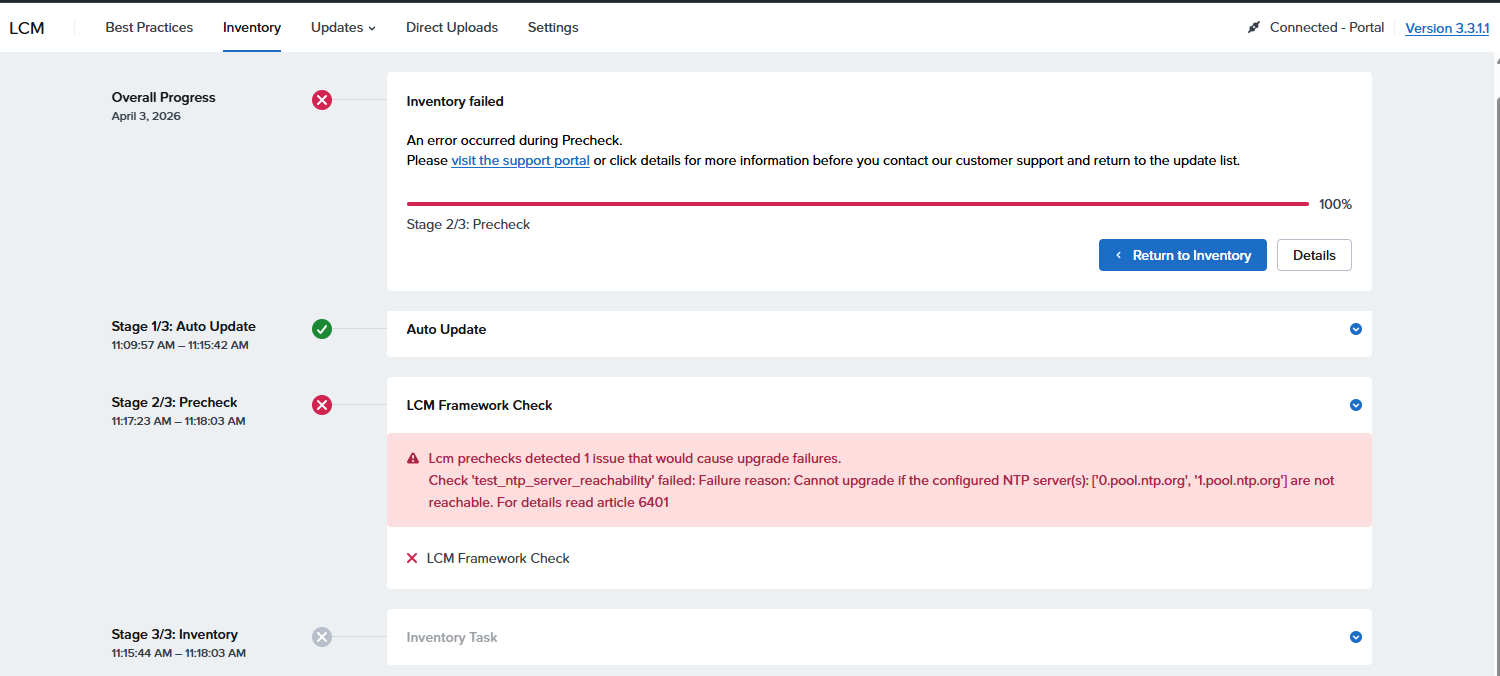
error alert
Lcm prechecks detected 1 issue that would cause upgrade failures.

Check 'test_ntp_server_reachability' failed: Failure reason: Cannot upgrade if the configured NTP server(s): ['0.pool.ntp.org', '1.pool.ntp.org'] are not reachable. For details read article 6401
設定してあるのに上記エラーが出ているというときに、Hypervisor側でNTP動作状況確認のコマンドを実行
[root@NTNX-4bc9a811-A ~]# chronyc -n sources -v

  .-- Source mode  '^' = server, '=' = peer, '#' = local clock.
 / .- Source state '*' = current best, '+' = combined, '-' = not combined,
| /             'x' = may be in error, '~' = too variable, '?' = unusable.
||                                                 .- xxxx [ yyyy ] +/- zzzz
||      Reachability register (octal) -.           |  xxxx = adjusted offset,
||      Log2(Polling interval) --.      |          |  yyyy = measured offset,
||                                \     |          |  zzzz = estimated error.
||                                 |    |           \
MS Name/IP address         Stratum Poll Reach LastRx Last sample
===============================================================================
^? 163.5.56.11                   0   9     0     -     +0ns[   +0ns] +/-    0ns
^? 109.61.109.140                0   9     0     -     +0ns[   +0ns] +/-    0ns
^? 192.168.1.1                   0   8     0     -     +0ns[   +0ns] +/-    0ns
[root@NTNX-4bc9a811-A ~]#
hypervisor階層では問題無く動作している模様
CVMの方を確認すると、設定されていないように見える
nutanix@NTNX-4bc9a811-A-CVM:192.168.1.14:~$ sudo chronyc -n sources -v

  .-- Source mode  '^' = server, '=' = peer, '#' = local clock.
 / .- Source state '*' = current best, '+' = combined, '-' = not combined,
| /             'x' = may be in error, '~' = too variable, '?' = unusable.
||                                                 .- xxxx [ yyyy ] +/- zzzz
||      Reachability register (octal) -.           |  xxxx = adjusted offset,
||      Log2(Polling interval) --.      |          |  yyyy = measured offset,
||                                \     |          |  zzzz = estimated error.
||                                 |    |           \
MS Name/IP address         Stratum Poll Reach LastRx Last sample
===============================================================================
nutanix@NTNX-4bc9a811-A-CVM:192.168.1.14:~$
実際設定ファイルにもない
nutanix@NTNX-4bc9a811-A-CVM:192.168.1.14:~$ sudo cat /etc/chrony.conf
# Auto generated by ChronyConfig on Thu Jul  9 01:28:04 2026

local stratum 10
driftfile /var/lib/chrony/drift
maxdistance 16.0
makestep 1.0 3
rtcsync
allow 0.0.0.0/0
allow 127.0.0.1
allow ::/0
allow ::1
leapsectz right/UTC
cmdport 0
logdir /var/log/chrony
log measurements statistics tracking
nutanix@NTNX-4bc9a811-A-CVM:192.168.1.14:~
hypervisorの方の /etc/chrony.confを確認すると、こちらにはNTPサーバ設定はある
[root@NTNX-4bc9a811-A ~]# cat /etc/chrony.conf
# Use public servers from the pool.ntp.org project.
# Please consider joining the pool (http://www.pool.ntp.org/join.html).

# Record the rate at which the system clock gains/losses time.
driftfile /var/lib/chrony/drift

# Allow the system clock to be stepped in the first three updates
# if its offset is larger than 1 second.

# Enable kernel synchronization of the real-time clock (RTC).
rtcsync

# Enable hardware timestamping on all interfaces that support it.
#hwtimestamp *

# Increase the minimum number of selectable sources required to adjust
# the system clock.
#minsources 2

# Allow NTP client access from local network.
#allow 192.168.0.0/16

# Serve time even if not synchronized to a time source.
#local stratum 10

# Specify file containing keys for NTP authentication.
keyfile /etc/chrony.keys

# Get TAI-UTC offset and leap seconds from the system tz database.
leapsectz right/UTC

# Specify directory for log files.
logdir /var/log/chrony

# Select which information is logged.
#log measurements statistics tracking
port 0
cmdport 0
server 1.pool.ntp.org maxpoll 10 iburst
server 0.pool.ntp.org maxpoll 10 iburst
server 192.168.1.1 maxpoll 10 iburst
[root@NTNX-4bc9a811-A ~]#
ncli clusterコマンドでNTPサーバ一覧を取得すると、サーバ群は登録されていることになっている
nutanix@NTNX-4bc9a811-A-CVM:192.168.1.14:~$ ncli cluster get-ntp-servers

    NTP Servers               : 0.pool.ntp.org, 1.pool.ntp.org, 192.168.1.1
nutanix@NTNX-4bc9a811-A-CVM:192.168.1.14:~$
CVM内部からNTPサーバ群へのNTPポート123へのアクセスは成功する
nutanix@NTNX-4bc9a811-A-CVM:192.168.1.14:~$ nc -vz -u 192.168.1.1 123
Ncat: Version 7.92 ( https://nmap.org/ncat )
Ncat: Connected to 192.168.1.1:123.
Ncat: UDP packet sent successfully
Ncat: 1 bytes sent, 0 bytes received in 2.02 seconds.
nutanix@NTNX-4bc9a811-A-CVM:192.168.1.14:~$ nc -vz -u 163.5.56.11 123
Ncat: Version 7.92 ( https://nmap.org/ncat )
Ncat: Connected to 163.5.56.11:123.
Ncat: UDP packet sent successfully
Ncat: 1 bytes sent, 0 bytes received in 2.01 seconds.
nutanix@NTNX-4bc9a811-A-CVM:192.168.1.14:~$ nc -vz -u 109.61.109.140 123
Ncat: Version 7.92 ( https://nmap.org/ncat )
Ncat: Connected to 109.61.109.140:123.
Ncat: UDP packet sent successfully
Ncat: 1 bytes sent, 0 bytes received in 2.02 seconds.
nutanix@NTNX-4bc9a811-A-CVM:192.168.1.14:~$
とりあえずCVMの/etc/chrony.confを直接編集してみた
nutanix@NTNX-4bc9a811-A-CVM:192.168.1.14:~$ sudo vi /etc/chrony.conf
nutanix@NTNX-4bc9a811-A-CVM:192.168.1.14:~$ sudo cat /etc/chrony.conf
# Auto generated by ChronyConfig on Thu Jul  9 01:28:04 2026

local stratum 10
driftfile /var/lib/chrony/drift
maxdistance 16.0
makestep 1.0 3
rtcsync
allow 0.0.0.0/0
allow 127.0.0.1
allow ::/0
allow ::1
leapsectz right/UTC
cmdport 0
logdir /var/log/chrony
log measurements statistics tracking
server 192.168.1.1 maxpoll 10 iburst
nutanix@NTNX-4bc9a811-A-CVM:192.168.1.14:~$ sudo systemctl restart chronyd
nutanix@NTNX-4bc9a811-A-CVM:192.168.1.14:~$ sudo chronyc -n sources -v

  .-- Source mode  '^' = server, '=' = peer, '#' = local clock.
 / .- Source state '*' = current best, '+' = combined, '-' = not combined,
| /             'x' = may be in error, '~' = too variable, '?' = unusable.
||                                                 .- xxxx [ yyyy ] +/- zzzz
||      Reachability register (octal) -.           |  xxxx = adjusted offset,
||      Log2(Polling interval) --.      |          |  yyyy = measured offset,
||                                \     |          |  zzzz = estimated error.
||                                 |    |           \
MS Name/IP address         Stratum Poll Reach LastRx Last sample
===============================================================================
^? 192.168.1.1                   0   6     0     -     +0ns[   +0ns] +/-    0ns
nutanix@NTNX-4bc9a811-A-CVM:192.168.1.14:~$
とりあえずNTPを使えるようにした
CLIでcheck_ntpを実行
nutanix@NTNX-4bc9a811-A-CVM:192.168.1.14:~$ ncc health_checks network_checks check_ntp

####################################################
# TIMESTAMP : Thu Jul 09 01:52:10 2026 (UTC +0000) #
####################################################
Cluster Name: cvm
Cluster Id: 3772327690115644291
Cluster UUID: 00064e84-58d6-fd69-345a-000c29b67b83
Cluster Version: 6.8.1
NCC Version: 5.0.1-83db8d0f
    CVM ID(Svmid)            : 2
    CVM external IP          : 192.168.1.14
    Hypervisor IP            : 192.168.1.13
    Hypervisor version       : Nutanix 20230302.101026
    Node serial              : 61e640f9-e1fe-4ba3-a4cc-8c2384c95c9a
    Model                    : CommunityEdition
    Node Position            : A
    Block S/N                : 4bc9a811


Running : health_checks network_checks check_ntp
[==================================================] 100%
/health_checks/network_checks/check_ntp                                              [ WARN ]
---------------------------------------------------------------------------------------------+

Detailed information for check_ntp:
Node 192.168.1.14:
WARN: NTP servers configured on CVM (['192.168.1.1']) differ from those configured in the cluster (['0.pool.ntp.org', '1.pool.ntp.org', '192.168.1.1']).
WARN: The host (192.168.1.13) is not synchronizing with any NTP server. This might occur if none of the configured NTP servers are available or you are currently experiencing network instability determined by the high offset/high jitter.
Refer to KB 4519 (http://portal.nutanix.com/kb/4519) for details on check_ntp or Recheck with: ncc health_checks network_checks check_ntp --cvm_list=192.168.1.14
+-----------------------+
| State         | Count |
+-----------------------+
| Warning       | 1     |
| Total Plugins | 1     |
+-----------------------+
Plugin output written to /home/nutanix/data/logs/ncc-output-latest.log
nutanix@NTNX-4bc9a811-A-CVM:192.168.1.14:~$
NTPサーバ群の数が違うのでダメか
nutanix@NTNX-4bc9a811-A-CVM:192.168.1.14:~$ sudo vi /etc/chrony.conf
nutanix@NTNX-4bc9a811-A-CVM:192.168.1.14:~$ sudo cat /etc/chrony.conf
# Auto generated by ChronyConfig on Thu Jul  9 01:28:04 2026

local stratum 10
driftfile /var/lib/chrony/drift
maxdistance 16.0
makestep 1.0 3
rtcsync
allow 0.0.0.0/0
allow 127.0.0.1
allow ::/0
allow ::1
leapsectz right/UTC
cmdport 0
logdir /var/log/chrony
log measurements statistics tracking
server 192.168.1.1 maxpoll 10 iburst
server 1.pool.ntp.org maxpoll 10 iburst
server 0.pool.ntp.org maxpoll 10 iburst
nutanix@NTNX-4bc9a811-A-CVM:192.168.1.14:~$ sudo systemctl restart chronyd
nutanix@NTNX-4bc9a811-A-CVM:192.168.1.14:~$ sudo chronyc -n sources -v

  .-- Source mode  '^' = server, '=' = peer, '#' = local clock.
 / .- Source state '*' = current best, '+' = combined, '-' = not combined,
| /             'x' = may be in error, '~' = too variable, '?' = unusable.
||                                                 .- xxxx [ yyyy ] +/- zzzz
||      Reachability register (octal) -.           |  xxxx = adjusted offset,
||      Log2(Polling interval) --.      |          |  yyyy = measured offset,
||                                \     |          |  zzzz = estimated error.
||                                 |    |           \
MS Name/IP address         Stratum Poll Reach LastRx Last sample
===============================================================================
^? 192.168.1.1                   0   6     0     -     +0ns[   +0ns] +/-    0ns
^? 122.215.240.52                0   6     0     -     +0ns[   +0ns] +/-    0ns
^? 46.250.253.227                0   6     0     -     +0ns[   +0ns] +/-    0ns
nutanix@NTNX-4bc9a811-A-CVM:192.168.1.14:~$
再チェック
nutanix@NTNX-4bc9a811-A-CVM:192.168.1.14:~$ ncc health_checks network_checks check_ntp

####################################################
# TIMESTAMP : Thu Jul 09 01:57:28 2026 (UTC +0000) #
####################################################
Cluster Name: cvm
Cluster Id: 3772327690115644291
Cluster UUID: 00064e84-58d6-fd69-345a-000c29b67b83
Cluster Version: 6.8.1
NCC Version: 5.0.1-83db8d0f
    CVM ID(Svmid)            : 2
    CVM external IP          : 192.168.1.14
    Hypervisor IP            : 192.168.1.13
    Hypervisor version       : Nutanix 20230302.101026
    Node serial              : 61e640f9-e1fe-4ba3-a4cc-8c2384c95c9a
    Model                    : CommunityEdition
    Node Position            : A
    Block S/N                : 4bc9a811


Running : health_checks network_checks check_ntp
[==================================================] 100%
/health_checks/network_checks/check_ntp                                              [ ERR  ]
---------------------------------------------------------------------------------------------+

Detailed information for check_ntp:
Node 192.168.1.14:
ERR : node (service_vm_id: 2) : NTP synchronized to server which is neither in the cluster nor in the list of allowed NTP servers
WARN: The host (192.168.1.13) is not synchronizing with any NTP server. This might occur if none of the configured NTP servers are available or you are currently experiencing network instability determined by the high offset/high jitter.
Refer to KB 4519 (http://portal.nutanix.com/kb/4519) for details on check_ntp or Recheck with: ncc health_checks network_checks check_ntp --cvm_list=192.168.1.14

One or more plugins generated ERROR as there were insufficient data to validate results. Please resolve other reported issues and re-run the health checks.
+-----------------------+
| State         | Count |
+-----------------------+
| Error         | 1     |
| Total Plugins | 1     |
+-----------------------+
Plugin output written to /home/nutanix/data/logs/ncc-output-latest.log
nutanix@NTNX-4bc9a811-A-CVM:192.168.1.14:~$
KB-16363 を参照してみると、「sudo chronyc tracking」を実行して「Reference ID」のところにNTPサーバ名が出てるか確認、とある・・・ない
nutanix@NTNX-4bc9a811-A-CVM:192.168.1.14:~$ sudo chronyc tracking
Reference ID    : 7F7F0101 ()
Stratum         : 10
Ref time (UTC)  : Thu Jul 09 02:06:19 2026
System time     : 0.000000004 seconds slow of NTP time
Last offset     : +0.000000000 seconds
RMS offset      : 0.000000000 seconds
Frequency       : 5.919 ppm slow
Residual freq   : +0.000 ppm
Skew            : 0.000 ppm
Root delay      : 0.000000000 seconds
Root dispersion : 0.000000000 seconds
Update interval : 0.0 seconds
Leap status     : Normal
nutanix@NTNX-4bc9a811-A-CVM:192.168.1.14:~$

[root@NTNX-4bc9a811-A ~]# chronyc tracking
Reference ID    : 00000000 ()
Stratum         : 0
Ref time (UTC)  : Thu Jan 01 00:00:00 1970
System time     : 0.000000000 seconds slow of NTP time
Last offset     : +0.000000000 seconds
RMS offset      : 0.000000000 seconds
Frequency       : 5.788 ppm slow
Residual freq   : +0.000 ppm
Skew            : 0.000 ppm
Root delay      : 1.000000000 seconds
Root dispersion : 1.000000000 seconds
Update interval : 0.0 seconds
Leap status     : Not synchronised
[root@NTNX-4bc9a811-A ~]#
いろいろ試行していたところ、結局のところopenwrtで提供しようとしていたNTPに問題が出ていたようなので、別のLinuxでchronydによるNTPサーバを立てて見たところ、そちらではなんとかなった
nutanix@NTNX-4bc9a811-A-CVM:192.168.1.14:~$ ncc health_checks network_checks check_ntp --cvm_list=192.168.1.14

####################################################
# TIMESTAMP : Thu Jul 09 06:07:56 2026 (UTC +0000) #
####################################################
Cluster Name: cvm
Cluster Id: 3772327690115644291
Cluster UUID: 00064e84-58d6-fd69-345a-000c29b67b83
Cluster Version: 6.8.1
NCC Version: 5.0.1-83db8d0f
    CVM ID(Svmid)            : 2
    CVM external IP          : 192.168.1.14
    Hypervisor IP            : 192.168.1.13
    Hypervisor version       : Nutanix 20230302.101026
    Node serial              : 61e640f9-e1fe-4ba3-a4cc-8c2384c95c9a
    Model                    : CommunityEdition
    Node Position            : A
    Block S/N                : 4bc9a811


Running : health_checks network_checks check_ntp
[==================================================] 100%
/health_checks/network_checks/check_ntp                                              [ WARN ]
---------------------------------------------------------------------------------------------+

Detailed information for check_ntp:
Node 192.168.1.14:
WARN: NTP servers configured on CVM (['0.pool.ntp.org', '192.168.1.1', '1.pool.ntp.org']) differ from those configured in the cluster (['0.pool.ntp.org', '1.pool.ntp.org', '192.168.1.1', '192.168.1.10']).
Refer to KB 4519 (http://portal.nutanix.com/kb/4519) for details on check_ntp or Recheck with: ncc health_checks network_checks check_ntp --cvm_list=192.168.1.14
+-----------------------+
| State         | Count |
+-----------------------+
| Warning       | 1     |
| Total Plugins | 1     |
+-----------------------+
Plugin output written to /home/nutanix/data/logs/ncc-output-latest.log
nutanix@NTNX-4bc9a811-A-CVM:192.168.1.14:~$
CVM内の/etc/chrony.confも書き換わっていた
nutanix@NTNX-4bc9a811-A-CVM:192.168.1.14:~$ sudo cat /etc/chrony.conf
# Auto generated by ChronyConfig on Thu Jul  9 06:11:50 2026

pool 0.pool.ntp.org iburst maxpoll 10
server 192.168.1.10 iburst maxpoll 10
pool 1.pool.ntp.org iburst maxpoll 10
server 192.168.1.1 iburst maxpoll 10
local stratum 10
driftfile /var/lib/chrony/drift
maxdistance 16.0
makestep 1.0 3
rtcsync
allow 0.0.0.0/0
allow 127.0.0.1
allow ::/0
allow ::1
leapsectz right/UTC
cmdport 0
logdir /var/log/chrony
log measurements statistics tracking
nutanix@NTNX-4bc9a811-A-CVM:192.168.1.14:~$