NFS v4ではUTF-8ファイルのみ使用でき、EUCファイル名は使用できない

むかしからSolarisサーバを使っているユーザのとこにNetAppを入れることになった。

どうやらEUC-JPファイル名のものがあるらしいのでNetAppのvolume language を ja_v1で作成してから検証してみたところ、Solaris10環境からNFSマウントして書き込もうとすると「引数が正しくありません」というエラーとなり書き込みが出来ない。

しばらくあれやこれや悩んだ結果、「NFS v4で許されているファイル名は UTF-8 記述のものだけ」という仕様上の問題であることが判明した。(RFC7530 Network File System (NFS) Version 4 Protocol の 12.4. String Encoding に記載)

このため、EUC-JPのファイル名を使いたい場合は、NFS ver3でマウントすることが必須、ということが分かった。

検証過程

まず、Solaris10環境から、NFS ver4で /mnt4 にマウントし、NFS ver3で /mnt3 にマウントした。

# mount 172.17.44.103:/eucvol /mnt4
# mount -o vers=3 172.17.44.103:/eucvol /mnt3
# df -h|grep mnt
mnttab                   0K     0K     0K     0%    /etc/mnttab
172.17.44.103:/eucvol   1.9G   808K   1.9G     1%    /mnt4
172.17.44.103:/eucvol   1.9G   808K   1.9G     1%    /mnt3
# mount|grep /mnt
/etc/mnttab on mnttab read/write/setuid/devices/rstchown/dev=4c80001 on (金)  8 月 12 15:30:07 2022
/mnt4 on 172.17.44.103:/eucvol remote/read/write/setuid/devices/rstchown/xattr/dev=4f40004 on (金)  8月 12 15:33:31 2022
/mnt3 on 172.17.44.103:/eucvol remote/read/write/setuid/devices/rstchown/vers=3/xattr/dev=4f40005 on (金)  8月 12 15:33:38 2022
#

この状態でそれぞれを確認すると、下記の様になっている。

# ls -l /mnt3
合計 8
-rw-r--r--   1 root     root           6  8月 10日  14:37 test.txt
-rw-r--r--   1 root     root           0  8月 10日  14:51 てすと
drwxr-xr-x   2 root     other       4096  8月 10日  14:35 表計算
# ls -l /mnt4
合計 8
-rw-r--r--   1 root     root           6  8月 10日  14:37 test.txt
-rw-r--r--   1 root     root           0  8月 10日  14:51 礒窿
・rwxr-xr-x   2 root     daemon      4096  8月 10日  14:35 茵 ・
・
#

NFS ver4でマウントしている /mnt4 の方は日本語文字(EUC-JP)が正常に表示できていない。

次に /tmp/てすと2 のコピーを試みる

# cp  /tmp/てすと2 /mnt4
cp: /mnt4/てすと2 を作成できません: 引数が正しくありません。
# LANG=C
# export LANG
# date
Fri Aug 12 15:37:39 JST 2022
# cp  /tmp/てすと2 /mnt4
cp: cannot create /mnt4/てすと2: Invalid argument
#

NFS ver4でマウントしている領域へのコピーは「引数が正しくありません」、英語メッセージの場合は「Invalid argument」で失敗する。

対して、NFS ver3領域へのコピーは問題なく実施できる。

# LANG=ja
# export LANG
# date
2022年08月12日 (金) 15時39分11秒 JST
# cp /tmp/てすと2 /mnt3
# ls -l /mnt3
合計 8
-rw-r--r--   1 root     root           6  8月 10日  14:37 test.txt
-rw-r--r--   1 root     root           0  8月 10日  14:51 てすと
-rw-r--r--   1 root     root           8  8月 12日  15:39 てすと2
drwxr-xr-x   2 root     other       4096  8月 10日  14:35 表計算
#

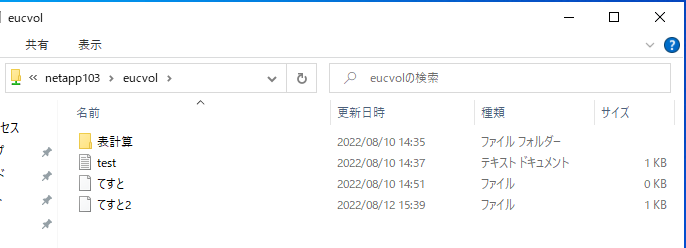
なお、この領域をWindows側から見た場合はこのように正常に表示されている。

ちなみに・・・ONTAP CLIからvolume languageコマンドを実行してみたところ、標準権限(admin)とadvanced権限とで表示される内容が違う、というのが興味深かったです。

netapp101::> volume language -vserver netapp103 -volume eucvol

Volume language is ja_v1 (Japanese euc-j) for netapp103:eucvol

netapp101::> set adv

Warning: These advanced commands are potentially dangerous; use them only when directed to do so by NetApp personnel.
Do you want to continue? {y|n}: y

netapp101::*> volume language -vserver netapp103 -volume eucvol

Volume language is ja_v1 (Japanese euc-j) for netapp103:eucvol

Translation Versions
        OEM Character set is cp932_v1|cp932_v1|Wed Jan 22 23:18:24 UTC 2003 for netapp103:eucvol

        NFS Character set is eucj_v1|eucj_v1|Wed Jan 22 00:46:42 UTC 2003 for netapp103:eucvol

netapp101::*>

ONTAP 9.x環境でActive DirectoryとNISとでユーザ名マッピングを行わせた場合の確認手法

Windows Active Direcotry環境とNISによるユーザ管理を行っているSolaris/Linux環境の両方からONTAP 9.9上の共有にアクセスする場合、ユーザ名マッピング設定を行う。

ただ、指定したマッピングが正しく動いているかを確認する方法がわかりにくいのでメモ書き。

(関連資料「ONTAP 9.xでntpやDNSの動作確認」)

今回はStorage VM:netapp103に対して、 Active Directory:VM2 (vm2.adosakana.local) と NISドメイン:nisdom を接続した。

NISに接続できているかを確認

「vserver services name-service nis-domain show」で設定を確認

netapp101::> vserver services name-service nis-domain show
                                  NIS
Vserver       Domain              Server
------------- ------------------- ------------------------------------
netapp103     nisdom              172.17.44.49

netapp101::>

接続できているかを確認するには「vserver services name-service nis-domain show-bound」を実行する。接続できている場合は「Bound NIS Server」に接続出来ているNISサーバのIPアドレスが表示される。

netapp101::> vserver services name-service nis-domain show-bound
                                  Bound
Vserver       Domain              NIS Server
------------- ------------------- -----------------
netapp103     nisdom              172.17.44.49

netapp101::>

接続できていない場合は、「-」という表示になる

netapp101::> vserver services name-service nis-domain show-bound
                                  Bound
Vserver       Domain              NIS Server
------------- ------------------- -----------------
netapp103     nisdom              -

netapp101::>

なぜ接続出来ていないかを確認するには権限をdiagに変更した上で「vserver services name-service nis-domain show-bound-debug」を実行して確認する。(advancedでは使えない)

netapp101::*> vserver services name-service nis-domain show-bound-debug
                                  Bound              Bound
Vserver       Domain              NIS Server         Status
------------- ------------------- -----------------  -------------------
netapp103     nisdom              172.17.44.49       Could not connect to server

netapp101::*>

今回は「Could not connect to server」ということで、NISサーバへの接続がうまくいかない、ということだった。確認したところ、途中のfirewall設定の問題でNISに関するポートが空いていないためだった。

設定変更後、手動でNISの再接続を行う場合は、ypbindの再起動を行う。このコマンドはノード名を指定することに注意

netapp101::*> vserver services name-service ypbind restart -node ノード名

netapp101::*>

再度「vserver services name-service nis-domain show-bound-debug」を実行して「Status: Success」となっていれば問題ない。

netapp101::*> vserver services name-service nis-domain show-bound-debug
                                  Bound              Bound
Vserver       Domain              NIS Server         Status
------------- ------------------- -----------------  -------------------
netapp103     nisdom              172.17.44.49       Success

netapp101::*>

ネームサービススイッチ設定

/etc/nsswitch.confに相当する設定をStorage VMに対して行い、ユーザ名とグループ名に関してNISから情報を持ってくるように設定する。

設定を確認するには「vserver services ns-switch show」を実行する

netapp101::> vserver services ns-switch show
                               Source
Vserver         Database       Order
--------------- ------------   ---------
netapp103       hosts          files,
                               dns
netapp103       group          files,
                               nis
netapp103       passwd         files,
                               nis
netapp103       netgroup       files
netapp103       namemap        files
netapp101     hosts          files,
                               dns
netapp101     group          files
netapp101     passwd         files
8 entries were displayed.
netapp101::>

UNIX側でLDAP情報を使っていない場合は、LDAPを登録する必要は無い。(Windows側だけでActive Directory/LDAPを使っている場合はnsswitchには登録しない)

なお、ONTAP 9.xでは、NISを使用できるのは passwd, group, netgroup となっており、hosts では使用できない。

情報取得の確認

まず、UNIX側のユーザ名とUIDに関する情報がひけるかを確認するため「vserver services name-service getxxbyyy getpwbyname」と「vserver services name-service getxxbyyy getpwbyuid」を実行する。

これらはadvanced権限が必要となっているので「set adv」で切り替えてから実行する。

netpp101::*> vserver services name-service getxxbyyy getpwbyname -vserver netapp103 -username osakanataro
pw_name: osakanataro
pw_passwd: !!
pw_uid: 1000
pw_gid: 1000
pw_gecos:
pw_dir: /home/osakanataro
pw_shell: /bin/bash


netpp101::*> vserver services name-service getxxbyyy getpwbyuid -vserver netapp103 -userID 1000
pw_name: osakanataro
pw_passwd: !!
pw_uid: 1000
pw_gid: 1000
pw_gecos:
pw_dir: /home/osakanataro
pw_shell: /bin/bash


netpp101::*>

このような形で情報が引けたら問題ない

うまく取得出来ていない場合は、下記の様な出力となる

netapp101::*> vserver services name-service getxxbyyy getpwbyname -vserver netapp103 -username osakanataro

Error: command failed: Failed to resolve osakanataro. Reason: Entry not found for
       "username: osakanataro".

netapp101::*>

マッピング設定

UNIX/Linuxのユーザ名/UIDとWindowsのユーザ名/SIDを変換するには ONTAPにネームマッピング設定を行う必要がある。

WindowsからUNIX/Linuxに対するマッピング(win-unix)と、UNIX/Linuxに対するマッピング(unix-win)の2種類を設定する必要がある。

netapp101::> vserver name-mapping show

Vserver:   netapp103
Direction: win-unix
Position Hostname         IP Address/Mask
-------- ---------------- ----------------
1       -                 -                   Pattern: VM2\\*
                                          Replacement: *

Vserver:   netapp103
Direction: unix-win
Position Hostname         IP Address/Mask
-------- ---------------- ----------------
1       -                 -                   Pattern: *
                                          Replacement: VM2\\*
2 entries were displayed.

netapp101::>

基本的に1対1となるようであれば、「ADドメイン\Windowsユーザ名」→「UNIXユーザ名」というルール(win-unixにある「VM2\\* → *」)と「UNIXユーザ名」→「ADドメイン\Windowsユーザ名」(unix-winにある「* → VM2\\*」)を設定することになる。

なお、”\”は2つ指定する必要がある。

マッピングの確認

実際にどのようなマッピングが行われているのかを確認するには「vserver services access-check name-mapping show」を使います。このコマンドもadvanced権限が必要です。

netapp101::*> vserver services access-check name-mapping show -vserver netapp103 -direction win-unix -name osakanataro

ATTENTION: Mapping of Data ONTAP "admin" users to UNIX user "root" is enabled, but the following information does not reflect this mapping.

'osakanataro' maps to 'osakanataro'


netapp101::*> 

Windowsの名前からUNIXを探すときはにユーザ名を「-name “vm2\osakanataro”」というように”でくくると正常な動作とならないので注意。
また、ドメインとユーザの区切りは「\」と2つ続ける必要がある。

netapp101::*> vserver services access-check name-mapping show -vserver netapp103 -direction win-unix -name vm2\\osakanataro

ATTENTION: Mapping of Data ONTAP "admin" users to UNIX user "root" is enabled, but the following information does not reflect this mapping.

'vm2\\osakanataro' maps to 'osakanataro'


netapp101::*> vserver services access-check name-mapping show -vserver netapp103 -direction unix-win -name osakanataro

'osakanataro' maps to 'VM2\osakanataro'


netapp101::*>

なお、NISサーバにアクセスできない場合にこのコマンドを実行すると、以下の様な結果になります。

netapp101::*> vserver services access-check name-mapping show -vserver netapp103 -direction unix-win -name osakanataro

Vserver: netapp103 (internal ID: 3)

Error: RPC map name request procedure failed
  [  4 ms] Mapping Successful for Unix-user 'osakanataro' to Windows
           user 'VM2*' at position 1
  [    11] Successfully connected to ip 172.17.44.49, port 445 using
           TCP
  [    59] Unknown error: 12
  [    59] Failed to initiate Kerberos authentication. Trying NTLM.
  [    70] Encountered NT error (NT_STATUS_MORE_PROCESSING_REQUIRED)
           for SMB command SessionSetup
  [    95] Successfully authenticated with DC
           samba.adosakana.local
  [   109] Encountered NT error (NT_STATUS_PENDING) for SMB command
           Read
  [   117] Could not find Windows name 'VM2*'
**[   120] FAILURE: Name mapping for UNIX user 'osakanataro' failed.
**         Explicit Mapping failed and no default mapping found

Error: command failed: Failed to find mapping for the user. Reason: "SecD
       Error: The mapped user does not exist and no default user is defined".

netapp101::*>

ファイル権限確認

ONTAP上に置かれているファイルの権限をONTAP OS上から確認する「vserver security file-directory show-effective-permissions」がadvanced権限にあります。

確認したいファイル/ディレクトリをフルパスで指定します。

Windows側ユーザ名でアクセスした場合の確認。このコマンドではドメインとユーザの区切りは「\」が1つとなる。

netapp101::*> vserver security file-directory show-effective-permissions -vserver netapp103 -win-user-name VM2\osakanataro -path /sharevol/testfile.txt

                        Vserver: netapp103
              Windows User Name: VM2\osakanataro
                 Unix User Name: osakanataro
                      File Path: /sharevol/testfile.txt
                CIFS Share Path: -
          Effective Permissions:
                                 Effective File or Directory Permission: 0x1f01ff
                                        Read
                                        Write
                                        Append
                                        Read EA
                                        Write EA
                                        Execute
                                        Delete Child
                                        Read Attributes
                                        Write Attributes
                                        Delete
                                        Read Control
                                        Write DAC
                                        Write Owner
                                        Synchronize

netapp101::*>

UNIX/Linux側からアクセスした場合の確認

netapp101::*> vserver security file-directory show-effective-permissions -vserver netapp103 -unix-user-name osakanataro -path /sharevol/testfile.txt

                        Vserver: netapp103
              Windows User Name: VM2\osakanataro
                 Unix User Name: osakanataro
                      File Path: /sharevol/testfile.txt
                CIFS Share Path: -
          Effective Permissions:
                                 Effective File or Directory Permission: 0x1f01ff
                                        Read
                                        Write
                                        Append
                                        Read EA
                                        Write EA
                                        Execute
                                        Delete Child
                                        Read Attributes
                                        Write Attributes
                                        Delete
                                        Read Control
                                        Write DAC
                                        Write Owner
                                        Synchronize

netapp101::*>

細かい動作確認

ユーザ名/UID/SID変換の詳細を確認したい場合は、advanced権限にある「vserver services access-check authentication」を使います

UNIX用ユーザ名からUNIX UIDを検索

netapp101::*> vserver services access-check authentication translate -vserver netapp103 -unix-user-name osakanataro
1000


netapp101::*>

UNIX UIDからUNIX用ユーザ名を検索

netapp101::*> vserver services access-check authentication translate -vserver netapp103 -uid 1000
osakanataro


netapp101::*>

UNIX UIDからWindows用SIDを検索

netapp101::*> vserver services access-check authentication uid-to-sid -vserver netapp103 -uid 1000
SID: S-1-5-21-937304154-1581684492-536532533-1180


netapp101::*>

SIDからUNIX用ユーザ名 と Windows用ユーザ名を検索

netapp101::*> vserver services access-check authentication sid-to-unix-name -vserver netapp103 -sid S-1-5-21-937304154-1581684492-536532533-1180
    SID Type: User
   Unix Name: osakanataro
 Domain Name: VM2
Windows Name: osakanataro


netapp101::*>

Windows用ユーザ名からSIDを検索。このコマンドではドメインとユーザの区切りは「\」が1つとなる。

netapp101::*> vserver services access-check authentication translate -vserver  netapp103 -win-name osakanataro
S-1-5-21-937304154-1581684492-536532533-1180


netapp101::*> vserver services access-check authentication translate -vserver  netapp103 -win-name vm2\osakanataro
S-1-5-21-937304154-1581684492-536532533-1180


netapp101::*>
NetApp上から他のサーバに対してSSH接続する

2025/05/09追記:ONTAP9.12.1リリース以降この技が塞がれて 2025年現在ではdiagアカウントのロック解除を行う必要があります。diagアカウントへのパスワード設定は不要なのでそれほど手間ではないでしょう→「NetApp ONTAPから他サーバに気軽にsshできる穴がふさがれてしまった

シリアル接続したNetApp上から他のサーバに対してSSH接続する方法

まず、diagモードになる

netapp1::> set diag

Warning: These diagnostic commands are for use by NetApp personnel only.
Do you want to continue? {y|n}: y

netapp1::*>

次に「system node systemshell -node localhost -command ssh ユーザ名@接続先」で接続する

netapp1::*> system node systemshell -node localhost -command ssh root@ホスト名
The authenticity of host 'xxxxxxx (xxxxxxx)' can't be established.
ECDSA key fingerprint is SHA256:IX4Bar+J8/eOeFoSu+QPIUWxxxxxxxxxxxxxI.
Are you sure you want to continue connecting (yes/no/[fingerprint])? yes
Warning: Permanently added 'xxxxxxx' (ECDSA) to the list of known hosts.
root@xxxxxxx's password:
Last login: Wed Apr 20 16:03:51 2022 from xxxxxxx
[root@xxxxxxx ~]#

TeraTermマクロでコマンド出力結果を使って別のコマンドを実行する

NetAppの設定をTeraTermマクロで取得出来るようにマクロを作成中し https://github.com/osakanataro/get-ontap-config で公開中です。

物理ディスク一覧を作成する際、単純に「storage disk show」で取得すると、2ノードの表示が入り交じり、どちらに所属している物理ディスクなのか判別が面倒。

なので、「storage disk show -nodelist ノード名」という形で出力を分けたいのだが、NetAppに対して「system node show -fields node」で取得したノード一覧からノード名を抜き出して、それぞれに対してコマンドを実行するためには、TeraTermマクロで実装できるのかを調査した。

調査

まず、NetAppのノード名一覧の出力を確認

netapp01::> system node show -fields node
node
-------------
netapp01-01
netapp01-02
2 entries were displayed.

netapp01::>

ノードとして「netapp01-01」と「netapp01-02」があることを確認。

また、system node showコマンドの出力のうち最初の2行はヘッダ、そして、ノード名出力後に「~ entries were displayed.」と出力がある。これらは使わないので除外が必要。

スクリプト

サンプルとして、ノード一覧を表示して、各ノードに対して「system node run -node ノード名 hostname」を実行する、というものを作成した。

setsync 1
timeout=60
strdim nodenames 20
I=0
sendln 'system node show -fields node'
recvln ; コマンド入力 のecho出力  をスキップ
recvln ; ヘッダ部分 をスキップ
recvln ; --- 部分 をスキップ

endflag=1
while endflag=1
	recvln
	strscan inputstr 'displayed.'
	if result>0 then
		endflag=0
	else
		nodenames[I] = inputstr
		I=I+1
	endif
endwhile
wait '::> '

J=0
while I > J
	sendln 'system node run -node ' nodenames[J] ' hostname'
	wait '::> '
	J=J+1
endwhile

setsync 0

スクリプトの解説

今回のようなコマンド出力結果を受け取る場合は、「setsync 1」を実行して、確実に出力結果を受け取る設定(同期)とする必要がある。

次に「recvln」する際、TeraTermマクロからNetAppに送信した文字列もrecvlnで受け取ることになっているため、最初の1行は捨てている。(recvlnして、その後、何の処理もしていない)

続けて2行がヘッダなので、「recvln」で2行分受け取り、何も処理していない。

「2 entries were displayed.」というエントリ以降の行は不要なので、whileを終了する処理を入れるが、1台だったりすると1 entry wasとかになったりしそうなのでdisplayed.だけで終了検出。

whileを抜けたあとは、コマンドプロンプトの「::> 」が来るまで待ちを入れる。

スクリプト実行例

netapp01::> system node show -fields node
node
-------------
netapp01-01
netapp01-02
2 entries were displayed.

netapp01::> system node run -node netapp01-01 hostname
netapp01-01
netapp01::> system node run -node netapp01-02 hostname
netapp01-02
netapp01::>

ONTAPで未接続のイーサポートを無効化する手法

NetApp ONTAPのWeb管理画面 ONTAP System Managerは、未使用でネットワークケーブルを接続していないポートがあると、オフラインになってるポートがあるよ、的な警告を表示する。

System Managerからだと簡単にネットワークポートの無効化が設定できる

無効化したいポートを選択して、「無効化」

続行します。

選択したポートのグラフィックが灰色に変化します。

さて、この操作、コマンドで行うにはどうすればいいのか?

まず、状況については「network port show」で確認出来ます。

fas8300::> network port show

Node: fas8300-01
                                                  Speed(Mbps) Health
Port      IPspace      Broadcast Domain Link MTU  Admin/Oper  Status
--------- ------------ ---------------- ---- ---- ----------- --------
a0a       Default      -                up   9000     -/-     healthy
a0a-1000  Default      Storage          up   9000     -/-     healthy
e0M       Default      Default          up   1500  auto/1000  healthy
e0c       Cluster      Cluster          up   9000 100000/100000 healthy
e0d       Cluster      Cluster          up   9000 100000/100000 healthy
e0e       Default      -                up   9000  auto/25000 healthy
e0f       Default      -                up   9000  auto/25000 healthy
e0g       Default      -                up   9000  auto/25000 healthy
e0h       Default      -                down 9000  auto/-     -

Node: fas8300-02
                                                  Speed(Mbps) Health
Port      IPspace      Broadcast Domain Link MTU  Admin/Oper  Status
--------- ------------ ---------------- ---- ---- ----------- --------
a0a       Default      -                up   9000     -/-     healthy
a0a-1000  Default      Storage          up   9000     -/-     healthy
e0M       Default      Default          up   1500  auto/1000  healthy
e0c       Cluster      Cluster          up   9000  auto/100000 healthy
e0d       Cluster      Cluster          up   9000  auto/100000 healthy
e0e       Default      -                up   9000  auto/25000 healthy
e0f       Default      -                up   9000  auto/25000 healthy
e0g       Default      -                up   9000  auto/25000 healthy
e0h       Default      -                up   9000  auto/25000 healthy
18 entries were displayed.

fas8300::>

しかし、network port modifyで指定できるオプションには、link up/downに関する設定がなさそう・・・

fas8300::> network port modify -node fas8300-01 -port e0h -?
  [ -mtu <integer> ]                                            MTU
  [ -autonegotiate-admin {true|false} ]                         Auto-Negotiation Administrative
  [ -duplex-admin {auto|half|full} ]                            Duplex Mode Administrative
  [ -speed-admin {auto|10|100|1000|10000|100000|40000|25000} ]  Speed Administrative
  [ -flowcontrol-admin {none|receive|send|full} ]               Flow Control Administrative
  [ -ipspace <IPspace> ]                                        IPspace Name

fas8300::>

マニュアルの「network port modify」を確認してみると下記の記述がある。

[-up-admin {true|false}] – Up Administrative (privilege: advanced)
The administrative state of the port. If set to true, the port is used if it is operational. If set to false, the port is configured down.

標準の管理CLIではなく、advanced以上の権限であれば実行できる、とのこと。

fas8300::> set advanced

Warning: These advanced commands are potentially dangerous; use them only when directed to do so by NetApp
         personnel.
Do you want to continue? {y|n}: y

fas8300::*>

advancedモードに切り替えてから、再度オプション一覧を確認

fas8300::*> network port modify -node fas8300-01 -port e0h -?
  [ -mtu <integer> ]                                            MTU
  [ -autonegotiate-admin {true|false} ]                         Auto-Negotiation Administrative
  [ -duplex-admin {auto|half|full} ]                            Duplex Mode Administrative
  [ -speed-admin {auto|10|100|1000|10000|100000|40000|25000} ]  Speed Administrative
  [ -flowcontrol-admin {none|receive|send|full} ]               Flow Control Administrative
  [ -up-admin {true|false} ]                                    *Up Administrative
  [ -ipspace <IPspace> ]                                        IPspace Name
  [ -ignore-health-status {true|false} ]                        *Ignore Port Health Status

fas8300::*>

設定出来る項目に現れました。

fas8300::*> network port modify -node fas8300-01 -port e0h -up-admin true

fas8300::*>

設定が反映されたかを確認します

fas8300::*> network port show

Node: fas8300-01
                                                                       Ignore
                                                  Speed(Mbps) Health   Health
Port      IPspace      Broadcast Domain Link MTU  Admin/Oper  Status   Status
--------- ------------ ---------------- ---- ---- ----------- -------- ------
a0a       Default      -                up   9000     -/-     healthy  false
a0a-1000  Default      Storage          up   9000     -/-     healthy  false
e0M       Default      Default          up   1500  auto/1000  healthy  false
e0c       Cluster      Cluster          up   9000 100000/100000 healthy false
e0d       Cluster      Cluster          up   9000 100000/100000 healthy false
e0e       Default      -                up   9000  auto/25000 healthy  false
e0f       Default      -                up   9000  auto/25000 healthy  false
e0g       Default      -                up   9000  auto/25000 healthy  false
e0h       Default      -                up   9000  auto/25000 healthy  false

Node: fas8300-02
                                                                       Ignore
                                                  Speed(Mbps) Health   Health
Port      IPspace      Broadcast Domain Link MTU  Admin/Oper  Status   Status
--------- ------------ ---------------- ---- ---- ----------- -------- ------
a0a       Default      -                up   9000     -/-     healthy  false
a0a-1000  Default      Storage          up   9000     -/-     healthy  false
e0M       Default      Default          up   1500  auto/1000  healthy  false
e0c       Cluster      Cluster          up   9000  auto/100000 healthy false
e0d       Cluster      Cluster          up   9000  auto/100000 healthy false
e0e       Default      -                up   9000  auto/25000 healthy  false
e0f       Default      -                up   9000  auto/25000 healthy  false
e0g       Default      -                up   9000  auto/25000 healthy  false
e0h       Default      -                up   9000  auto/25000 healthy  false
18 entries were displayed.

fas8300::*>

全てのポートがupになりました。

System Managerの方でも表示がupに戻ったかを確認できました。

Web GUIだと簡単に設定変更できるものが、コマンドだとadvanced権限必要だった、というのは驚きでした。